Optimising capacity management for museums
Redesigning the capacity management feature for a SaaS ticketing product for museums

Project brief
Capacity management is a core feature of the SaaS ticketing product designed for museums. It is directly related to the number of tickets available for a specific time slot.
With the legacy feature, customers could not optimally manage their capacity and sometimes they had to manually calculate the capacity and enter values into the system. This situation caused frustration and a rise in customer complaints. Some customers were reluctant to renew their contracts given these constraints, which made this a priority feature improvement for the business.
Related case study: Redesigning the ticketing SaaS product for museums
Platform
Web application
Domain
Ticketing
Year
2022
My role
As Senior UX Designer, I facilitated customer research and stakeholder workshops to understand the need for optimisation. I independently led the concept exploration and final designs. For the usability study, I collaborated with a fellow designe,r and for visual designs, I coordinated with the design system team.
As a deliverable, I designed and supported the development of a calendar based workflow. It was appreciated by the customers due to its visual clarity and ease of understanding.
Research
Customer interviews were conducted across various museums to understand their current workflow and the existing gaps in the system. Internally I interviewed customer support representatives and customer success managers to understand the how they handle customer issues.
Specific customer painpoint
One museum had a unique workflow requirement which directly impacted their revenue. Initially it was considered as an edge case, but it revealed limitations in the legacy system and a need to be resolved with the redesign.
Unique workflow
The museum had multiple rooms with timed sessions, each session requiring 7 to 8 minutes. They had calculated their ideal time slot to be 7.5 minutes. So visitors move from one room to another room, and new visitors enter the first room after an average of 7.5 minutes. Achieving this would maximise their revenue, but the legacy workflow could not accomodate this and their one time slot per hour remained unused.

"We had to reschedule a school group due to an overlap with a tourist group booking. Overlaps are not shown in the system"
- Museum employee
Capacity management
Capacity management of museums is the process of balancing available resources with the current and future visitor demand. The primary goals are to maximise revenue, prevent overcrowding and elevate the visitor experience.
Factors which impact capacity
Museum related factors like staff availability, renovations, workshops, display change etc. or visitor related factors like holiday, special event, weather etc. directly impact capacity.
Capacity relation with ticket availability
Capacity is directly related to the number of tickets available for sale. Each museum calculates the number of available tickets per time slot based on the capacity of multiple spaces in their museum.
Visibility for customer stakeholders
Based on the size and type of museum, they had different stakeholders who required access to either edit this capacity or view the capacity to make other arrangements.
Museum visitors
Museums receive different type of visitors and the number of visitors vary based on multiple factors.
Types of visitors,
-
Individuals
-
Locals
-
Tourists
-
-
Groups
-
Schools
-
Tourists
-
Visitors increase during,
-
Weekends
-
Holidays
-
Rainy day
-
Tourist season
-
Rare artefact exhibition
-
Festivals or events

Design principles
Research findings helped understand the customer requirements and business needs. It further helped to define some design principles which helped in achieving both while maintaining a good user experience.
-
Capacity must be visible through a visual elment
-
Ease the visibility of capacity across locations and products
-
Reduce manual calculation of capacity, move incrementally towards automated suggestions
-
Ensure a seamless integration with sales channels to reflect correct time slots and ticket availability
Designs
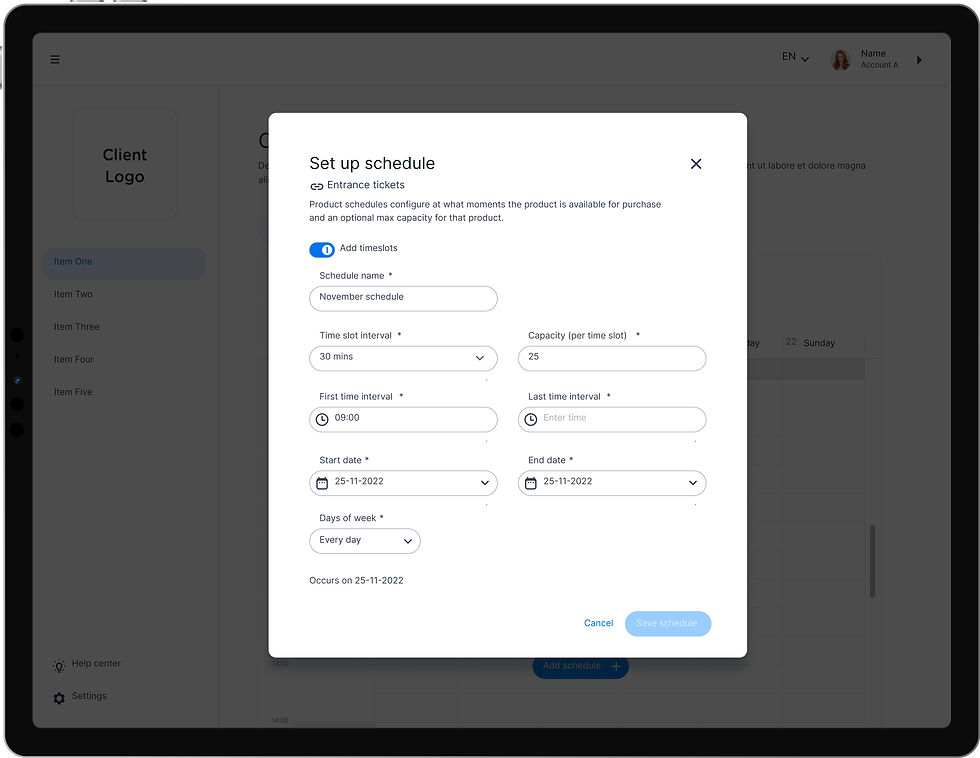
Based on the research and design principles, a calendar-based deisgn concept was finalised and implemented.
A calendar chosen was chosen because it is inherently visual and maps directly to how museums think about capacity in terms of days, time slots, and scheduled events. A familiar calendar format reduced the learning curve and made capacity information immediately scannable. The calendar view displayed capacity per time slot, flagged overlaps between bookings, and gave staff a consolidated view of availability across locations and products. This directly addressed the core pain point of having to manually track and calculate capacity outside the system.


Usability study
The findings from the usability study were documented and categorised into must-have, should-have and good-to-have improvements. This was further discussed with the team to assess the business priority and dev effort. Based on that incremental changes were planned.

Impact
The improved workflow and designs for capacity management was appreciated by the customers due to its visual clarity and ease of understanding. From business perspective it added value through customer retention and customer trust. From a technical perspective it helped in ensuring scalability and modularity.
Scalability
The redesign focused on technical and business scalability. The modular components could be altered to meet individual customer needs ensuring that unique customer requests could be handled without additional effort. From a business perspective it focused on monetisation aspect by having advanced paid features.
Integration
The redesign gave an opportunity to easily integrate third part sales channels with the capacity management module. So instead of having to manually update, customers were able to have one accurate source of data for all sales channels including their own website and all third part applications.
Usability
Intuitive and streamlined workflows led to better user experience and drastically reduced the chances of error. Improved visual feedback increased clarity in understanding the capacity across locations. Multiple stakeholders were able to refine the view as per their role and requirements.
My learnings
The project enhanced my understanding of complex user needs and the importance of considering unique customer requirements while redesigning the workflows.
-
Using the modular design approach reduced the technical effort needed to meet different customer needs. It reinforced that evaluating the need for a modular approach should be done at an early stage
-
Complex processes are intense, and hence users need visual overview and feedback to feel confident about their decisions. This is especially critical when it directly impacts revenue generation
-
Designing for B2B products requires thinking beyond customer archetypes. Understanding different customer business models and defining customer archetypes helps in feature monetisation and in defining development priorities.